
 Managed IT Services
 Business Continuity (BCDR)
 Cloud Telephony
 Managed Infrastructure
 Microsoft Azure
 Microsoft Teams Phone
 Cyber Security Services
 Microsoft 365 For Business
 Brisbane
 Aviation
 Healthcare
 Field Service
 Finance
 Manufacturing
 Small Business
 Legal
Legal Travel
How to Switch Managed IT Providers Without Disrupting Your Business
April 23, 2026by Levit8 IT Solutions

Switching managed IT providers can feel risky when your systems, security and day-to-day operations depend on a smooth handover. But staying with an IT provider that is slow to respond, repeatedly fixes the same problems or gives you little visibility can carry its own business risk.
A well-planned switch should do the opposite: protect access, maintain continuity and give your business clearer control over its managed IT environment. This guide explains how to change providers with minimal disruption and how to decide whether it’s time to make the move.
See how Levit8 manages the transition from your current IT provider.
How Do You Know When It’s Time to Switch Managed IT Providers?
It may be time to switch managed IT providers when recurring IT problems, slow resolution times, poor communication or limited visibility begin affecting day-to-day operations. One frustrating support ticket may not justify changing providers, but a repeated pattern can indicate that the current IT relationship is no longer meeting the needs of the business.
The warning signs are often operational before they become commercial. Problems keep returning after they have supposedly been fixed. Tickets receive responses without reaching a clear resolution. Technology decisions happen reactively, and it becomes difficult to understand what is being monitored, improved or planned.
Unclear service scope can make this harder, particularly when the business does not know what is and isn’t included in its managed IT service. Over time, those issues can make the bigger question less about “Is our IT provider good enough?” and more about “What is staying with this provider costing the business?”
Signs Your Current IT Provider May No Longer Be the Right Fit
The same IT problems keep coming back.
A temporary fix is not the same as resolving the underlying issue.
Response is confused with resolution.
Fast acknowledgement means little if important problems remain unresolved.
You have limited visibility over your IT environment.
Reporting should help you understand risks, priorities and what happens next.
Support feels reactive rather than proactive.
Your provider should help prevent recurring problems, not simply wait for another ticket.
Costs or responsibilities are becoming unclear.
You should understand what is included, what sits outside scope and who is accountable.
You are already researching other managed IT providers.
Reaching the comparison stage is itself a reason to objectively review whether the current arrangement still fits.
Not every service issue means you should switch managed IT providers. The decision becomes more important when problems form a pattern, affect business operations or remain unresolved despite being raised with your current provider.
Before changing providers, document the issues you are experiencing, review your current agreement and ask whether the provider has a credible plan to address them. If the answer is still unclear, comparing alternatives becomes a reasonable next step.
Already questioning your current IT provider?
See how Levit8 approaches a controlled transition from an existing provider.
Is Staying With the Wrong IT Provider Riskier Than Switching?
Staying with the wrong IT provider can carry as much operational risk as switching providers, particularly when recurring problems, unclear responsibilities or poor visibility remain unresolved. Switching introduces transition risks such as downtime, access issues and knowledge loss, but these risks can be reduced through a documented and staged handover.
The decision should therefore not be framed as “switching is risky, staying is safe.” Both options carry risk. The better comparison is whether the known problems with your current provider outweigh the manageable risks of moving to a new one.
Compare the Risk of Staying With the Risk of Switching
| If You Stay | If You Switch |
|---|---|
| Recurring issues may continue without addressing the underlying cause. | Transition risks can be identified and planned before the handover. |
| Poor visibility can make IT priorities difficult to assess. | Documentation and access can be validated before responsibility changes. |
| Reactive support can leave the business repeatedly responding to problems. | Support expectations and escalation paths can be agreed with the new provider. |
| Unclear scope can make costs and responsibilities harder to predict. | Contracts, licensing and responsibilities can be reviewed before transition. |
| Existing knowledge gaps remain part of the current environment. | The handover creates an opportunity to document systems, ownership and dependencies. |
Switching managed IT providers does not automatically solve poor processes, weak documentation or technical debt. A new provider should be able to explain how it will identify those issues, protect business continuity and establish clear ownership during the transition.
What Should You Check Before Switching Managed IT Providers?
Before switching managed IT providers, confirm who owns and controls your business-critical systems, accounts, licences, documentation and administrative access. Resolving access gaps before the handover reduces the risk of downtime, security issues and delays when responsibility moves to the incoming provider.
At a minimum, confirm:
- Microsoft 365 and Azure access, including global admin accounts, MFA ownership and billing control
- Domain registrar and DNS access
- Firewall, network and Wi-Fi credentials
- Backup platforms, retention settings, restore responsibility and alerting
- Endpoint protection and monitoring tools
- Telephony, shared files, remote access and line-of-business systems
- Asset register
- Commercial records including contract dates, exclusions, vendor contacts and third-party dependencies
If any of that is unclear, fix it before major changes begin. A provider transition is not the time to discover that nobody can access your tenant, firewall, or backups.
Common Risks When Switching IT Providers (and How to Reduce Them)
| Risk | What It Can Look Like | How to Reduce the Risk |
|---|---|---|
| Downtime | Email, files, remote access or phones stop working during the cutover. | Stage the changes, validate dependencies and schedule work around business hours. |
| Security gaps | Old tools are removed before new security controls are active. | Keep monitoring, endpoint security, MFA and backup oversight active throughout the transition. |
| Hidden costs | Surprise licence overlap, exit friction or unsupported third-party services. | Review contracts, billing, service scope and vendor responsibilities early. |
| Loss of access | No one has the correct admin account, registrar login or firewall control. | Confirm ownership and privileged access before the handover starts. |
| Knowledge loss | The outgoing provider leaves behind poor notes and unresolved issues. | Capture documentation, system maps, open tickets and escalation contacts before cutover. |
A controlled IT provider transition should establish system ownership, administrative access, documentation, licensing responsibilities and support escalation paths before the outgoing provider disengages. This gives the incoming provider a clearer starting point and reduces the likelihood that missing access or undocumented dependencies disrupt the handover.
How to Switch Managed IT Providers Without Disrupting Your Business
To switch managed IT providers without disrupting your business, plan the transition before the outgoing provider disengages. A controlled handover should confirm system ownership and administrative access, document the existing environment, stage critical changes, maintain continuity protections and validate the new support model before the transition is considered complete.
The safest approach is a phased handover rather than a single cutover. This gives the incoming managed IT provider time to identify dependencies, resolve access gaps and understand how critical systems support day-to-day operations before making major changes.
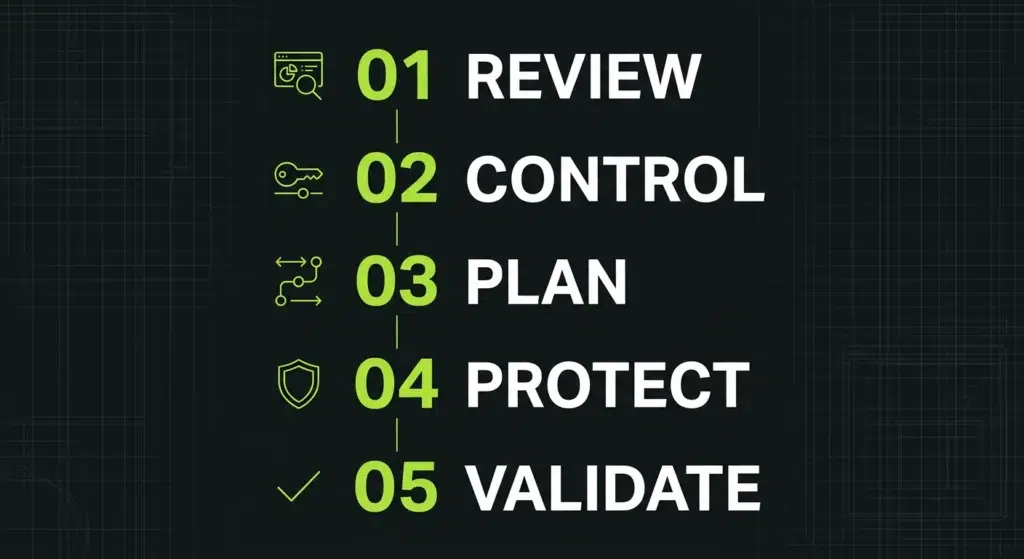
1. Review Your IT Environment Before Making Changes
The incoming managed IT provider should assess the existing environment before making major changes. This includes critical systems, user dependencies, vendor relationships, security controls, backups and recurring support issues. Identifying these dependencies early helps uncover risks that could otherwise appear during the handover.
2. Confirm System Ownership and Administrative Access
Your business should know who owns and controls each critical platform. Confirm access to Microsoft 365 or other cloud environments, domains, backups, licences, telephony, internet services and network infrastructure. If ownership or administrative access sits with the outgoing provider, resolve it before the transition progresses.
3. Build a Staged IT Transition Plan
Avoid treating the switch as a single “big bang” cutover. A staged transition allows access to be validated, documentation to be collected, dependencies to be reviewed and services to be stabilised before critical changes are made. Staff should also know what is changing, when it will happen and who to contact for support.
4. Keep Business Continuity and Security Controls Active
Backups, endpoint security, monitoring, patching and escalation paths should remain active throughout the transition. If an existing control needs to be removed, the replacement should be ready before that protection disappears.
5. Validate the New IT Support Model
The handover is not complete simply because systems have moved to the new provider. Ticket routing, escalation procedures, monitoring, user support and communication channels should be tested so the business knows how support will operate after the transition.
In practical terms, a successful managed IT provider switch should feel staged rather than sudden: understand the environment, establish control, protect continuity, make changes deliberately and verify that the new support model works.
Planning a switch from your current IT provider?
See how Levit8 approaches the handover, from understanding your existing environment to establishing ongoing support.
What Should Your New Managed IT Provider Do in the First 14 Days?
In the first 14 days after switching managed IT providers, the incoming provider should verify administrative control, review security and backup protections, test support processes, document inherited risks and establish clear reporting. The goal is to stabilise the environment before moving from transition work into ongoing IT management.
A successful handover does not end when accounts and systems are transferred. The first two weeks should confirm that the new provider has the access, visibility and processes needed to support the business effectively.
What Should Happen During the First Two Weeks?
1. Confirm Administrative Control – Verify access across Microsoft 365, Azure, backups, network infrastructure, DNS and other business-critical platforms.
2. Review Security Controls – Check MFA coverage, privileged access, endpoint protection, patching, monitoring and other controls inherited during the transition.
3. Verify Backup and Recovery Readiness – Confirm backups are running as expected and clarify who is responsible for monitoring, restoration and escalation if recovery is required.
4. Test Support and Escalation Paths – Verify ticket routing, escalation procedures and communication channels so users know where to go and urgent issues reach the right people.
5. Identify and Prioritise Inherited Risks – Document stale accounts, unsupported devices, unresolved faults, undocumented exceptions and other issues carried over from the previous provider.
6. Establish Reporting and Communication – Agree on how service performance, risks, priorities and planned improvements will be communicated to decision-makers.
By the end of the first 14 days, your new managed IT provider should be able to explain what it controls, what risks it has identified, what needs immediate attention and what happens next. If those answers are still unclear, the transition may be technically complete without the new support relationship being fully established.
What Should You Look for in a Managed IT Provider Before You Switch?
Before you switch managed IT providers, look for a partner that can clearly explain how it will manage the transition, protect business continuity, establish ownership and provide visibility after the handover. The difference between providers is not simply what services they list, but how clearly they can demonstrate accountability before, during and after the switch.
A strong transition partner should be able to show you what happens next without asking you to take the process on trust. If you are comparing potential providers, Levit8 also has a guide on what to look for when selecting managed IT services.
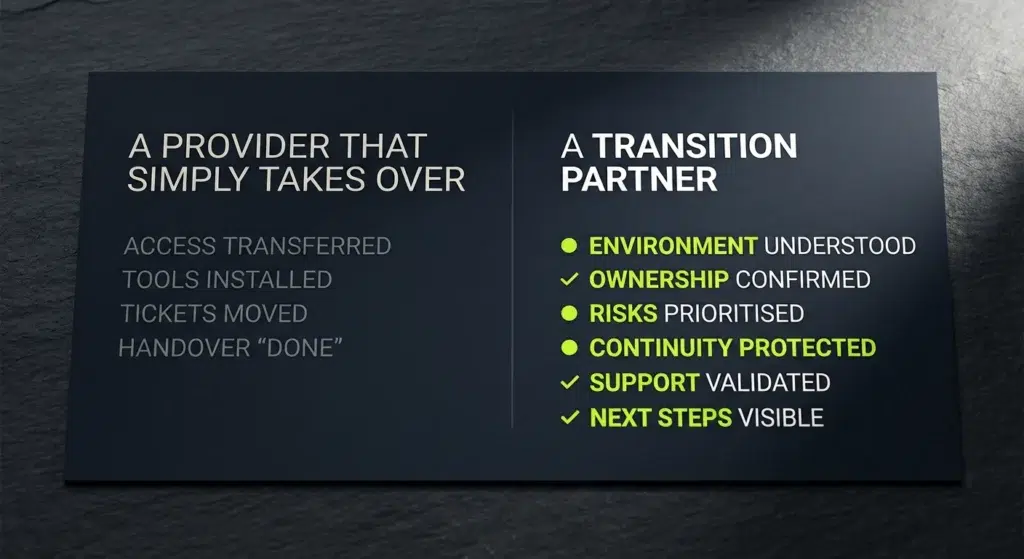
Levit8 approaches provider transitions as more than an access transfer. The handover is designed around understanding the existing environment, establishing administrative control, maintaining continuity and giving decision-makers clearer visibility over what is being managed and what happens next.
For businesses comparing providers, that creates a practical standard to test: can the incoming provider explain how it will take responsibility for your environment before you give it responsibility for your environment?
Does your current IT provider meet this standard?
Compare your current experience with the visibility, accountability and transition approach you should expect from a managed IT partner.
What Should a Successful Managed IT Provider Switch Actually Improve?
A successful managed IT provider switch should leave your business with clearer ownership, better visibility, stronger operational control and a support model that is easier to rely on. The goal is not simply to replace one provider with another; it is to improve how IT is managed, communicated and supported across the business.
That improvement should become visible after the handover. Decision-makers should understand who is accountable, users should know how to get support, critical systems should have clear ownership, and unresolved risks should have defined next steps.
| Before the Switch | After a Well-Managed Switch |
|---|---|
| Unclear ownership | Clear accountability for systems, platforms and support responsibilities. |
| Recurring unresolved issues | Documented priorities and next actions for inherited and ongoing issues. |
| Limited visibility over IT | Better visibility over risks, service performance and planned improvements. |
| Reactive support | Defined support and escalation paths so users know where to go when something matters. |
| Unknown inherited risks | Risks identified and prioritised with clearer responsibility for what happens next. |
| “Who handles this?” | Clear responsibility for support, systems and ongoing IT management. |
The purpose of switching managed IT providers is not simply to change who answers the support ticket. It is to create a clearer, more accountable and more dependable operating model for IT.
What Should You Ask a New Managed IT Provider Before You Sign?
Before signing with a new managed IT provider, ask how they will manage the transition, establish system ownership, protect business continuity, handle support escalation and report on ongoing performance. You should also understand exactly what is included in the service, what remains your responsibility and what happens if you decide to change providers again.
The answers matter as much as the services being offered. A prospective provider should be able to explain how the relationship will work in practice, not simply present a list of tools and capabilities.
1. How will you manage the transition from our current IT provider?
Ask for the actual handover process. A prospective provider should be able to explain what happens before, during and after responsibility transfers, including how access, documentation, dependencies and unresolved issues will be handled.
2. What access and documentation will you need before the handover?
Clarify which administrative accounts, system records, licences, network details and vendor information will be required. This can expose ownership or documentation gaps before they become transition problems.
3. How will you protect business continuity during the switch?
Ask what will remain active while systems, tools or responsibilities are transferred. Backups, security controls, monitoring and support escalation should not disappear simply because the provider is changing.
4. Who will own our Microsoft 365 tenant, domains, backups and other critical systems?
Your business should understand who owns critical accounts and who holds administrative control. A managed IT arrangement should not leave you uncertain about access to your own technology environment.
5. How are support requests prioritised and escalated?
Ask how incidents are classified, how urgent issues are escalated and who becomes involved when a problem cannot be resolved at first contact. Response time and resolution are not the same thing.
6. What is included in the managed service (and what sits outside scope)?
Ask for clarity around included support, projects, third-party services, licensing, after-hours assistance and other potential exclusions. Understanding scope before signing makes unexpected costs and responsibility gaps easier to avoid. You can also review how Levit8 structures its managed IT services when comparing service scope.
7. How will you report on performance, risks and planned improvements?
Reporting should help decision-makers understand more than ticket volumes. Ask how the provider will communicate recurring issues, security risks, technology priorities, service performance and recommended improvements.
8. What happens if we decide to change IT providers again?
Ask this before you sign, not when you leave. Understand how access, documentation, credentials, licences and other business-owned information would be returned or transferred if the relationship ends. A provider should be able to explain its exit process as clearly as its onboarding process.
A prospective managed IT provider should be able to answer these questions clearly before you sign an agreement. If ownership, transition responsibilities, support processes or service scope remain vague during the sales process, ask for clarification before making the decision.
A useful test: If a provider can explain how they will eventually hand your systems back to you before they have even taken them over, that is a stronger signal of clear ownership and transition planning.
Ready to Switch Managed IT Providers?
If you are considering switching managed IT providers, you do not need to commit to a change before understanding what the transition would involve. Start by identifying what is not working with your current arrangement, what your business needs from its next provider and what access, documentation and dependencies would need to be managed during the handover.
Levit8 can help you assess the transition, identify potential handover requirements and understand what moving from your current IT provider could look like for your business.
Thinking about changing your current IT provider?
Talk to Levit8 about what is not working today and what a controlled transition to a new managed IT provider could involve.
Frequently Asked Questions
1. How Long Does It Take to Switch Managed IT Providers in Australia?
The time required to switch managed IT providers depends on the size and complexity of your IT environment, the quality of existing documentation and the number of systems and third-party vendors involved. For many businesses, a phased transition is safer than a rushed cutover because it gives the incoming provider time to validate access, document dependencies and address potential risks before critical changes are made.
2. Can You Switch Managed IT Providers Without Downtime?
It is often possible to switch managed IT providers with little or no disruption, but this depends on the systems involved and how the transition is planned. The incoming provider should assess critical dependencies, maintain security and continuity protections during the handover, and schedule potentially disruptive changes around business operations rather than relying on a rushed cutover.
3. What Should You Ask the Outgoing IT Provider For?
Before switching IT providers, request administrative access, network and system documentation, backup information, licensing records, vendor contacts, open issue lists and details of tools installed in your environment. You should also confirm what the business owns, what the outgoing provider controls and what must be transferred before responsibility changes hands.
4. Who Should Manage the IT Provider Transition?
The incoming managed IT provider should normally coordinate the technical transition, while your internal team remains informed and involved in business decisions. The incoming provider should manage the handover process, validate access, capture documentation, identify dependencies and establish clear accountability for each stage of the transition.
5. How Do You Avoid Security Gaps When Switching IT Providers?
To reduce security gaps when switching IT providers, include security controls in the transition plan from the beginning rather than treating them as a post-handover task. Administrative access, MFA, endpoint protection, monitoring, patching and backup oversight should be checked before existing tools are removed or replacement controls are introduced.
6. What Happens to Microsoft 365 When You Switch IT Providers?
Switching IT providers does not normally require moving your business to a new Microsoft 365 tenant simply because the provider changes. Before the handover, confirm that your business has appropriate ownership and administrative access, review privileged accounts and MFA, and clarify how licensing, security settings and ongoing Microsoft 365 management will transfer to the incoming provider.
7. Should You Tell Your Current IT Provider Before Choosing a New One?
You can evaluate and select a new managed IT provider before formally ending the relationship with your current provider. Before giving notice, review your existing agreement, understand any notice or exit requirements, and work with the incoming provider to identify the access, documentation and transition information needed for the handover.
8. What Should a New Managed IT Provider Review First?
A new managed IT provider should first understand the existing IT environment, confirm administrative access and identify systems or dependencies that could affect business continuity. Early priorities typically include critical platforms, backups, security controls, network infrastructure, unresolved support issues and ownership of business-critical accounts.
9. Should You Look for a Managed IT Provider With Flexible Contract Terms?
Contract flexibility is worth considering when comparing managed IT providers because the agreement should clearly explain the commitment period, renewal terms, notice requirements and what happens if the relationship ends. Before signing, ask the provider to explain these terms alongside any onboarding, transition or exit requirements so you understand both how the relationship begins and how it can end.
Author
Levit8 IT Solutions
Levit8 is a leading Australian managed IT services provider, helping businesses across industries improve performance, boost security, and scale confidently through smart, reliable technology. With a passion for efficiency, security, and client success, our local team delivers expert support, enterprise-grade solutions, and a no-nonsense approach to IT. We empower small and mid-sized businesses with future-proof systems, robust cybersecurity, and seamless support—so technology becomes an asset, not a headache.